Showing posts with label learning. Show all posts

Sunday, May 1, 2016

The Oculus Rift Experience and Learning

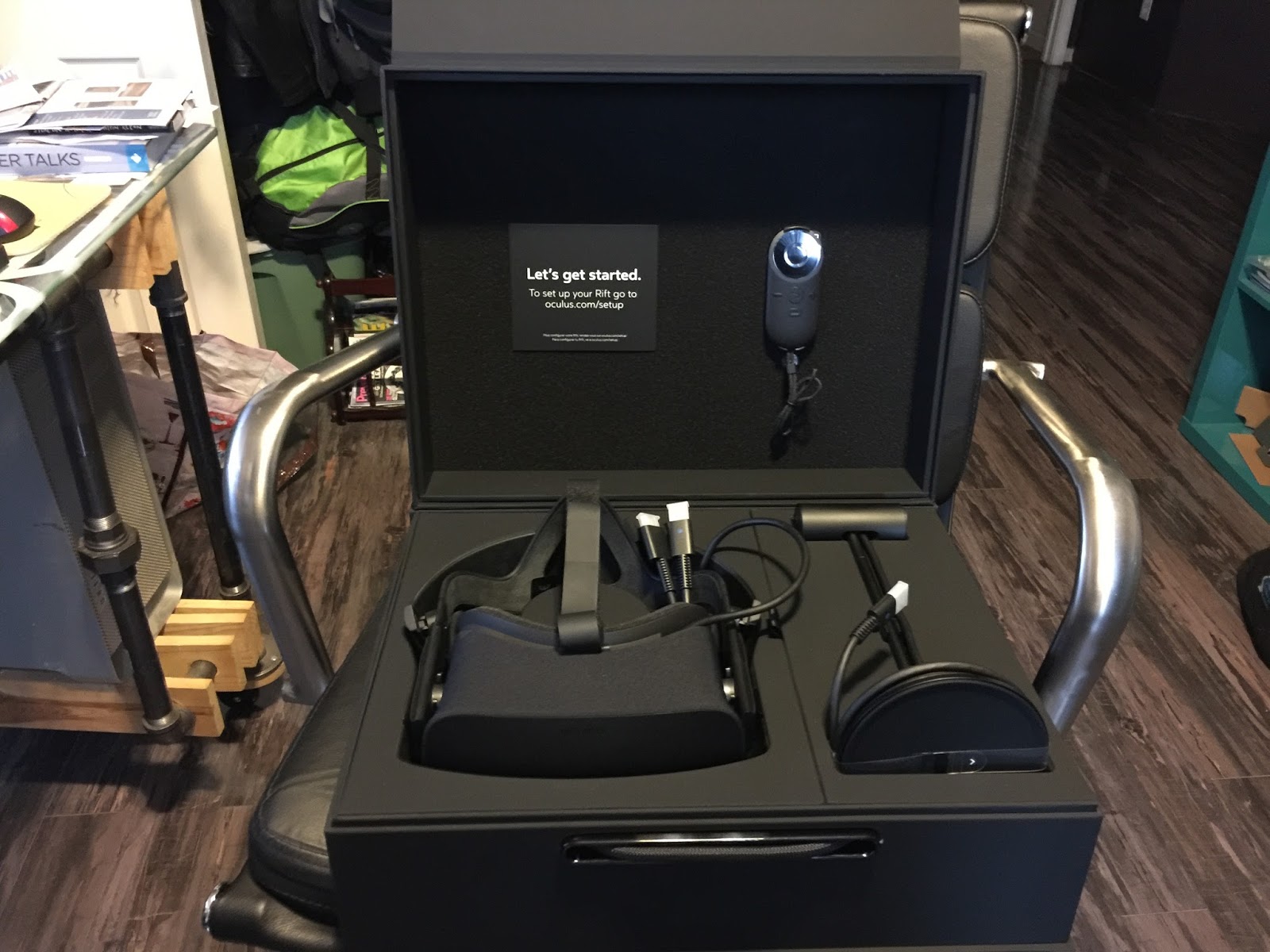
My Oculus Rift came this week and last night I got around to plugging all the components in and giving it a spin. Oculus Rift is the VR headset the Palmer Lukey developed and then sold to Facebook for $2 billion. There have been developer models for a few years now, but this year marked the release of the initial public version.

The public release includes the headset/headphones, motion sensor (that reminds me of an old Apple iSight camera, only black instead of silver,) a small remote control, and a XBox Controler. These devices all connect to a computer, with ample horsepower and a high end graphics card ( NVIDIA GTX 970 / AMD R9 290 equivalent or greater,) three 3.0 USB ports, 1 2.0 USB port and an HDMI port.

I have always been a fan of VR, since the days of QuickTimeVR, and continue to explore the medium with cameras and software to this date. When Google released Google Cardboard, almost two years ago now, I was quick to generate my own Cardboard creations using Unity, the Cardboard API, and IOS Developer tools. Cardboard really brought VR into the vernacular of many people, beyond the “nerds and geeks,” like myself. A put together a web site titled www.vrstorydesign.com that I might start sharing some of the things that interest me regarding VR. For now, it just contains a few vr  tours I created that you can explore in Cardboard or through your web browser.

With the release of Oculus Rift, we are beginning to see the very early beginnings of VR technology’s potential. The science fiction, so cleverly described in Ready Player One by Ernest Cline, begins to take shape on your face the minute you put on the Rift. After connecting the spaghetti of cables to your computer, and installing the software, the introductory sequence is quite amazing. The speed at which your brain gets sucked into the immersive experience is a bit spooky. The initial start up sequence of content is very appropriately positioned to induct you into the Rift VR world. I’m not a big fan of heights, and the introductory sequence includes a 3D generated scene on top of a “steampunk” looking skyscraper. I immediately felt the tinge of a panic attack coming on while looking out over the CGI ledge. I lost myself so quick in the sequence, that I found myself instinctively trying to look down at my hands to see what I was trying to select on my remote. That’s kind of hard to do when you have a mask covering your eyes.

After using the Rift for a little while, it’s not hard to see the potential for what this technology can bring to education and learning. As educators, we strive to engage students in the learning environment we call the classroom. If you are an OG geek like me, you can remember the days of watching Star Trek and the story lines involving the holodeck. Wearing the Rift begins to bring the whole holodeck idea to life. It is not too much of a stretch to imagine students excavating an archaeological site uncovering artifacts and evaluating them. Or standing within a tide pool on the Monterey Coast examining creatures in the pools, taking notes, virtual photographing them for later review, or researching what they are finding in a HUD in the corner of their view. Don’t worry about the technology isolating them from other people, there is a growing number of systems such as AltSpaceVR that are designed to bring people together to explore these environments together. One highly anticipated social vr environment is Project Sansar, from the Linden Labs folks. These are the people who created Second Life. This summer they are planning to open Project Sansar to content developers, with an anticipated launch in the Fall/Winter time frame.

I can foresee many opportunities for bringing VR to the classroom as the hardware and software continue to evolve. It is not completely out of the question, at the speed at which technology improves, that the full 60 frame per second, wireless from a mobile device, VR will soon replace the high end workstation and spaghetti of cables currently used to view VR. Who knows, VR and a mobile device could essentially eliminate the need for desktop computers. Early applications such as Tilt Brush by Google, and Virtual Desktop on Steam provide more reasons to compute directly though VR. The future of learning looks exciting!

Thursday, March 20, 2014

Evening Homework Observations...


I get home from the gym yesterday evening and my 9 year old daughter is doing her homework on the table the two of us built a couple years ago. She’s busy completing her work, collaborating with her classmate via video chat. I was struck by how ordinary she appeared as if saying unconsciously, “Why wouldn’t you collaborate with your classmate remotely to finish your homework via remote video chat?” She did not ask her mom if she could video conference with her friend, she just connected, as simple, and as common, as taking a pencil out of her backpack and beginning her school work.

This morning, I had to take Sawyer to school. Not my usual morning trip as she goes with mom. Mom teaches fifth grade at her school. Getting into the car she tosses her rolling backpack into the back seat, slides into the front seat next to me, and immediately plugs her cracked, two year old iPad touch into the car charger. On arriving at school, she hustles out of the truck, drags her monolithic backpack out of the back seat, tells me she loves me, and snatches the iPod touch in her other hand and marches off. She doesn’t ask if she can take her iPod touch, there is no hesitation in her actions, it’s a non-issue to her. It seems as common to her as taking a pencil out of her backpack and beginning her school work.

I have son who started his first year of college this year. This is not how fourth grade was for him ten years ago.

Tuesday, February 26, 2013

Students will...


(The following are student activities to address objectives and goals as they relate to 1:1 computing in K12. Specifically in the current draft, to address grade 6 next year.)


Students will...

  • take ownership of the device for the entire year.
  • access digital resources.
  • publish to an audience larger than their teacher.
  • share information.
  • collaborate with others.
  • contribute to the collective understanding.
  • collect a body of their work, electronically.
  • submit assignments, electronically.
  • access content targeted to their interests.
  • connect to events around the world.
  • contact primary sources.
  • communicate in multiple formats.
  • extend their learning day.
  • show evidence of their learning.
  • connect their parents to the school and their efforts.
  • share device with parents for parent education.
  • create content designed to be shared with others and to promote learning.
  • demonstrate keyword and Boolean search routines on the Internet, and evaluate results.
  • demonstrate a knowledge of copyright, be able to cite information in their own work, and have the opportunity to publish their own content to the greater body of knowledge.
  • use interactive ebooks and multimedia resources to explore literature and standards.
  • share strategies their teacher has modeled in class for staying safe in the real world and the digital world.
  • model proper and safe behavior with each other in class through lessons that require them to collaborate together and demonstrate best practices.
  • explore the use of social media tools, understand the concepts of social etiquette online, copyright and sharing, and how to safely use technology to further their interests.
  • be able to identify locations in their community via digital maps, and understand the relationship of their community to the larger world around them.
  • be able to describe community organizations, businesses, museums, art galleries, schools, government based on multimedia resources shared by their teacher.
  • be able to understand and share data about their community population based on data collected by community and government.
  • create blogs about a community organization and share information about those organizations, the needs they address and the services they provide.
  • be able to share aspects of stories, videos, recordings shared by their teacher that contain problems and solutions.
  • be able to describe the action story characters take to solve problems.
  • be able to solve simulated problems utilizing technology and problem solving strategies (seek collaboration, locate experts, build teams, define the problem, ask questions, etc.)
  • be able to analyze past real world events (history/Literature) and identify the characteristics of strategies used to develop a solution.
  • be able to identify current real world problems, use technology and problem solving strategies to develop a solution, and share out their process and solution.
  • allow parents to see portfolio and electronically subscribe to their child’s portfolio.
  • allow parents to receive targeted parent education on their digital device.
  • allow parents to view district systems on their digital device.
  • record school events and performances for parents who miss events due to work.
  • interact in classroom dialogue by contributing in non-threatening learning environments.
  • receive feedback from teacher without being singled out or embarrassed.
  • incorporate the arts, design, music, visual arts, photography into their demonstrations of learning.
  • understand logic and procedural thinking using app development examples.
  • access their work from any location with Internet access.
  • allow their parents to login to parent portal via their device.
  • communicate about school to parents supported by the device
Compare the above student activities with the CommonCore State Standards beginning at slide 18, 


Do the activities above support the CCSS in the slide deck?


CC licensed image courtesy of  flickingerbrad @ http://www.flickr.com/photos/56155476@N08/6660001925/sizes/m/in/photostream/

Sunday, June 24, 2012

Sponging At SocialEdCon & ISTE

We are no less sponge-like than an infant learning to speak. As we get older it’s not that we lose that sponge like capability for learning, it's that we develop a habit of not putting ourselves into an environment that allows us to “sponge” constructively. We become content with status quo. 

The topics and workshops of big conferences such as ISTE are only the prompts for the real work at these types of events. The real work is exposing ourselves to the ideas in the hallways, overhearing the conversations of strangers, and reading the comments and reflections related to those "prompts." I am a big believer that whether you like it or not, whether you seek to be sponge like, or you are just letting it happen to yourself, you are a sponge for life. Everything you hear, see, touch, feel has an effect on you. It shapes your ideas, your feelings, and your daydreams. Whether you're filling your car up at the gas station, listening to a colleague in a staff meeting, or attending a global education conference, you are being affected by your environment. 

We can not always control our environment, and thus the components of that environment that affect us. However, for a good amount of our conscious moments we can. Being able to control our environment provides us with a way to channel our experiences and thus the components of the environment that affect us. 

This is why I value experiences such as ISTE, and SocialEdCon. Go out and suck it all up this week!   

(CC photograph courtesy of Rev Stan on Flickr http://www.flickr.com/photos/revstan/4372883678/)

Friday, January 14, 2011

Shortchanging Learning


The last two days of professional development at times reminded me of when I was a kid and going to church every Sunday with my family. I remember many nice things about going to church, but at the same time, there were huge contradictions that left me struggling with questions of my faith. Our professional development over the two days have focused on the research of effective instructional design. Instruction that is designed with the focus squarely on the student and their learning. There were a lot of great ideas, such as emphasizing lessons that are designed to provide the student with a clear idea of the learning objective or learning goal; the use of graphic organizers to cement declarative knowledge; and tips for effectively using rubrics for student assessment and feedback. However, at times, especially when discussing the research on declarative knowledge, I found myself back in a church pew as a teenager, trying to decipher the logic behind what the priest was stating in his sermon.

Let me explain. For this particular workshop, the presenter had broken down instruction into two different categories, declarative knowledge and procedural knowledge. Declarative knowledge in simple terms is knowledge based on facts, details, concepts, and principles. Procedural knowledge is knowledge based on processes or skills, for example, how you probably learned to do long division. During the workshop, one of my “church pew” moments came when the facilitator was providing an example of a strategy to help teach declarative new knowledge. The presenter asked us if we could name all thirteen of the original United States colonies. I had been taking notes on my iPad and I immediately typed out the question into Google and almost before she had the words out of her mouth, I had multiple listings of the correct answer in my browser. She proceeded to demonstrate the use of a mnemonic device and spent the next eight to ten minutes creating a whimsical story about a cow using the beginning word parts of each of the thirteen original colonies. Was her strategy successful? Sure. There were some who could remember the story, and then recite the state names. But that’s not my point. Some people could argue that having students memorizing a whimsically story in order for them to recite the first thirteen colonies is not very useful learning. But that’s not my point either. My point is that we are using a tool for learning that would have been useful for students in 1776. It worked then, and it still works today, but it’s completely outmoded by the technology that we as adults use day in and day out. Mnemonic devices are a tool for the memorization of facts, concepts, details, and principles. Technology, search engines, and the web are tools for learning declarative knowledge too. The technology tools are much more efficient tools than those such as mnemonic devices. How many times this week have you used a mnemonic device to remember something in your work? How may times have you used your computer to look something up in your work?

I am afraid if we use the example above and multiply that by everything we are required to teach students, we are wasting a ton of time. In terms of the end result, reciting the original thirteen colonies, whether you use a mnemonic device or a search engine, the end results are the same, with one exception. If you use the search engine you’ll have banked approximately nine minutes to teach something else. Communities that recognize this fact potentially have the ability to increase student learning exponentially just in the fact that they have more time for real learning. Real learning that focuses students on the “whys” and “how comes?” Learning that requires students to think, form opinions and test out their ideas and opinions on each other. Does it really matter that students can recite all thirteen original colonies, or is it more important for them to understand what those thirteen colonies stand for? If we continue to use outmoded tools, I’m afraid we will have no time for the learning that matters most, the “whys” and the “how comes.” What do you think?

(Creative Commons image courtesy of isforinsects on flickr.com)

Monday, May 10, 2010

Creating With Computers (Part III)

Revolution is like a software Erector set. With a little bit of familiarity with the language, it is very easy to quickly create custom applications. I began the process of developing this tool by thinking about the ultimate goal, a software tool that students would use to hopefully improve their reading. I started with the ultimate goal in mind, and then worked back to components that would make that goal successful. The following is a list of features that I determined the student component should incorporate:

  • Simple student log-in a first grader could master.
  • The ability for a student to easily record themselves reading a passage of text.
  • The ability for a student to easily play back their recorded audio file.
  • A strategy to allow students to concentrate on what they read by providing them with a tool to count the number of words they read within the time limit.
  • A simple scale that allows students to rate how well they feel they read the passage.
  • The ability to identify at least one word that they felt was the most difficult to read.
  • A number presented at the end of the activity that represents their ranking/total score.

My hunch is that these described activities would help to improve a student's reading ability by steering them to think more acutely about their reading. Research has shown that special needs students actually do quite well working in a student-computer environment. The computer is often less threatening and students are less likely to be nervous or suffer from performance anxiety when in front of a computer as opposed to in front of their teacher. This I thought would hold true for all students. I envision this student tool being used in a center or independent group activity where students have 15-20 minutes at each activity.

After defining the components of the student software, it was time to decide on how it would be designed. I knew that I would want to be able to retrieve student work so that the students' teachers would be able to evaluate their students' work post activity. In order to do this, all student input would have to be stored in a database. Fortunately for me, Revolution provides this ability quite easily and I will be describing this process in a later section.

As I continued to work backward from the student activity component, my planning resulted in three supporting components. The first is the main administrator tool for creating teacher accounts. The second component is the teacher tool. The teacher tool should allow for the creation of individual student reports based on the students' activities. In addition, teachers should be able to create, edit, and delete students accounts. Finally, teachers should be able to create and edit new assessments/activities and assign assessments/activities to students in their class.

All these components require the storing of their data in a database. The creation of the database and the resulting tables in the database will be described in a later blog post.
(image courtesy of: http://www.flickr.com/photos/hinkelstone/2765597758/)

Thursday, February 28, 2008

PowerPoint Games - Updated

Here is an additional example of using PowerPoint games modeled after a very popular second language software strategy used by Rosetta Stone.


If the video does not appear above this text, click this link. (This link requires QuickTime player from Apple. You can download it here.

The link below is the screen cast tutorial that reviews the process of creating this type of PowerPoint game.

Tuesday, February 26, 2008

Creating Learning Games with PowerPoint

In part three of the Seal Surfer vocabulary resource re-mix, I will demonstrate how to create learning games using PowerPoint.


If the video does not appear above this text, click this link. (This link requires QuickTime player from Apple. You can download it here.


The following two links are a couple of tutorials covering two examples I whipped up to demonstrate using PowerPoint as a game. I also included the actual PowerPoint templates so that you can open them up and modify them for your own use.

Vocabulary Challenge - "Time Line Model"

Vocabulary Challenge - "Jeopardy Style Model"

The following screen cast is a tutorial that will walk you through the process of creating your very own PowerPoint game.

How to Create a PowerPoint Game - Tutorial


PowerPoint Game Links


FETC PowerPoint Games: http://teach.fcps.net/trt4/FETC03/fun2.htm

PowerPoint Game Templates: http://jc-schools.net/tutorials/PPT-games/

Parade of Games - http://facstaff.uww.edu/jonesd/games/index.html

PowerPoint Games - http://teach.fcps.net/trt14/Power%20Point%20Games/power_point_games.htm

Classroom Game Templates and More - http://www.murray.k12.ga.us/teacher/kara%20leonard/Mini%20T's/March%20Mini%20T-Games/Games.htm


Friday, February 8, 2008

The Beginning...

This is the first post to this new blog I have titled Edutonica. Edutonica will be dedicated to the sharing of information related to the creative use of technology and education. When looking up "tonica" on line, I found a definition of "tone" or "keynote." (I also like that it sounded close to electronica which is digital or electronic music, thus, electronic tone.) So this site is going to be about educational tone, or keynotes.

Stay "tuned" for more...